Git is "infinite undo + a save point you can never lose" — and "how teams build without overwriting each other." The web is just "what actually happens when you load a page." Frame it that way and the later modules stop feeling like magic.
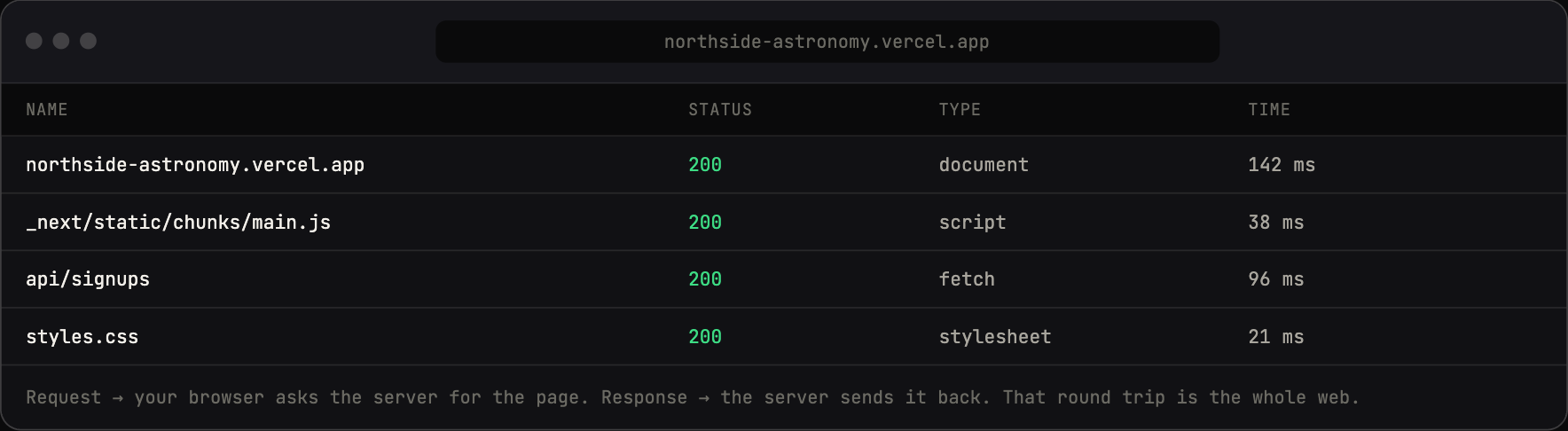
Open dev tools → Network → reload: the request your browser sends, and the response the server returns. The invisible, made visible.
Concepts
- Client/server/request/response: browser asks, server answers. That's the whole internet, simplified.
- Frontend vs. backend: what the user sees vs. what runs on the server.
- Git = save points (commits). GitHub = the cloud copy + history. Commit/push = save + upload.
- Why this matters now: databases, forms, and email all live on the backend — the part the user never sees. We're about to go there.
Talking points
- Loading a page = your browser sends a request, a server sends back a response.
- Frontend = the stuff you can see. Backend = the engine room.
- A commit is a save point with a name; you can always travel back.
- From here on, we build the engine room.
Live demo (I do)
- Open browser dev tools → Network tab → reload the live site → show the actual request/response. Make the invisible visible.
- Make a small change, have Claude commit it with a clear message, show the history on GitHub.
- Show "going back": revert to a previous commit.
Student activity (you do)
Students make a visible change to their site, then have Claude commit it with a good message, then find that commit on GitHub. Goal: they can name what a commit is and see their own history.
Copy-paste prompts
Explain in plain English what happens, step by step, when someone
opens my Vercel site in their browser. Keep it to 5 steps.
I just changed my homepage. Commit this with a clear message that
describes what changed, then push it. Tell me what the commit
message says and why good messages matter.
Where it breaks
- Concept overload. Keep it concrete and tied to their site. Don't lecture on HTTP verbs.
- Git confusion (merge conflicts). Avoid by having one person per repo at this stage; introduce branches only as a stretch.
Check for understanding
- What's a request and a response?
- Frontend or backend: a signup form's "save to database" step?
- What's a commit, in your own words?
Stretch
Have Claude create a branch, make a change there, and explain why teams use branches.
For the instructor
This is the one "concepts" module in a ship-first course, and it's deliberately short and anchored to things they already built. Don't let it become a lecture. If energy dips, cut it to 30 minutes and move on — they'll absorb the rest by doing.